M-Star Solve
Run Solver GUI
In M-Star Pre, click Solve in the toolbar to expose the options to run the simulation. Selecting Run the solver will export the case data (.stl, .xml files) and open the M-Star Solver GUI in the case directory. Next, specify the computational resources and click Run to start the simulation.
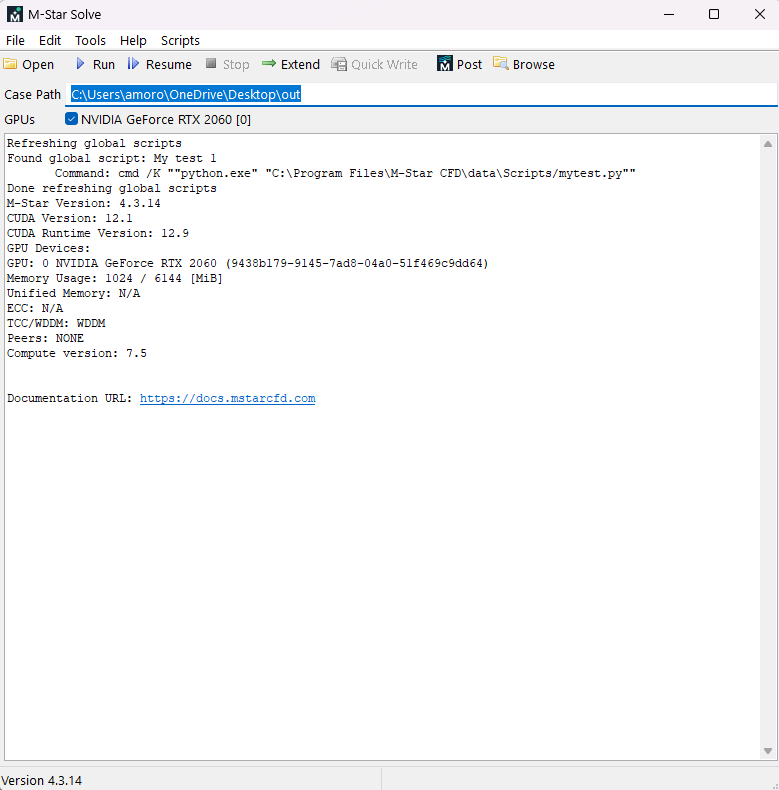
- Open
This opens the file explorer to the case directory (Windows only).
- Run
This starts the simulation with the configured resource.
- Resume
This resumes a simulation from the last check point.
- Stop
This stops a running simulation. This is attempted gracefully before force-terminating the solver.
- Extend
This makes quick edits to the solver input file to extend the run time of the simulation.
- Quick Write
TBA
- Post
This opens the post-processor with the case results.
- Browse
TBA
- Case Path
This specifies where your output data will be written.
- GPUs
The M-Star CFD Solver runs on GPUs. The specified GPU accelerators will be used to execute the solver.
Requirements for Multi-GPU usage on Windows
The GPU hardware must have peer-access. This lets the GPUs communicate with each other. The Solver GUI will check this requirement before running.
The GPU hardware must be configured in TCC mode which means any GPU used in a solver calculation cannot be currently used for any display. This may require using the
nvidia-smiutility to configure a given GPU.The GPU hardware must have the same processor architecture.
For more information about multi-GPU setup and usage, see Multi-GPU Setup.
Scripts
The Solver GUI has a Scripts menu which is a user-configurable area for running common tasks. See the Global Scripts documentation. There are some default scripts provided that will require M-Star Python (or equivalent) to be installed.
Restarting a Simulation
Within Windows environments, open M-Star Solve from the Windows start menu. You will be prompted to browse to the case directory corresponding to the simulation you want to restart. Click Resume to continue the simulation.