M-Star Launcher
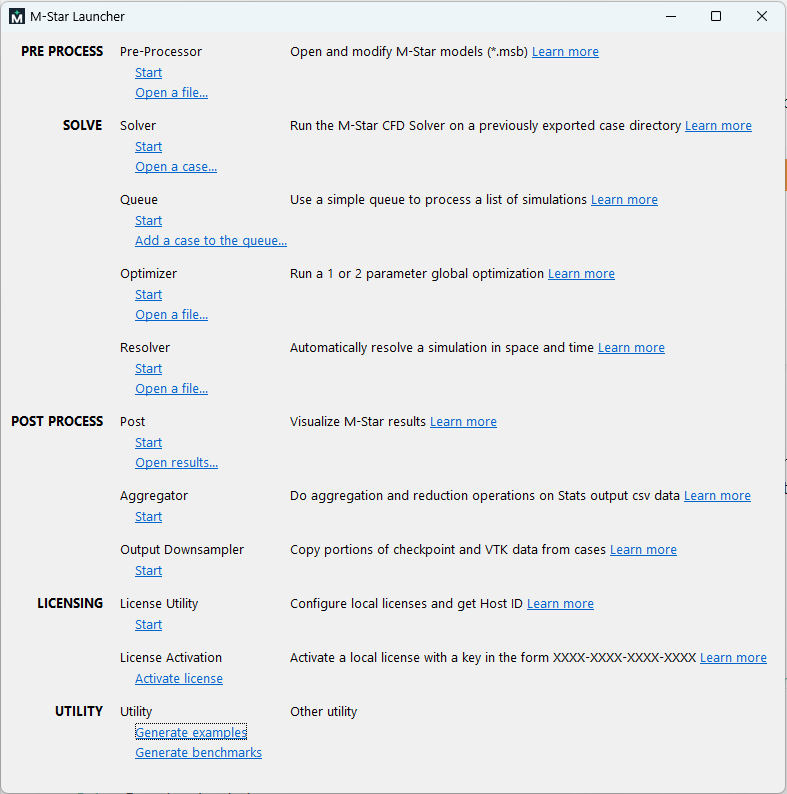
M-Star Launcher provides a centralized interface for accessing all M-Star utilities, allowing you to quickly move between pre-processing, solving, post-processing, and system tools. It serves as an entry point to the M-Star workflow, organizing each application by function so you can efficiently set up models, run simulations, analyze results, and manage supporting utilities.
 M-Star Pre
M-Star Pre is used to import CAD geometry, generate common geometry, define simulation parameters (fluid type, speeds, physics), visualize system set-up, and export input files for M-Star Solve.
 M-Star Solve
M-Star Solve is the standard solver application used to run individual simulations using the specified model setup and solver settings. It provides the core simulation execution environment for solving and monitoring CFD cases.
 M-Star Queue
M-Star Queue is a processing interface that allows the user to build a queue of simulations and run them on GPUs.
 M-Star Optimizer
M-Star Optimizer uses advanced optimization algorithms to optimize a given quantity by changing an input property.
 M-Star Resolver
M-Star Resolver automates grid sensitivity studies by running incrementally finer resolutions and checking a selected output for convergence. It repeats simulations at higher resolutions until the result stabilizes, then stops.
 M-Star Post
M-Star Post is the post-processing component of the software suite. It reads in data generated by the simulation. M-Star Post is used to generate snapshots and animations of output slice and volume data; plot time-evolving data from probes, calculators, and boundary conditions; and execute user-defined functions.
 Aggregator (Output Aggregator)
M-Star Output Aggregator combines statistics data from any number of cases. It can combine time series data from any number of cases and apply reductions on time series output across multiple cases.
Output Downsampler (Solver Output Data Manager)
M-Star Output Downsampler allows you to copy selected portions of solver output (VTK and checkpoint data), enabling you to retain only specific time steps—such as the final state—to reduce storage usage or prepare data for archiving.
License Utility (M-Star License Utility)
M-Star License Utility allows you to set up licenses, test and verify license options, and check out “roaming” licenses from a license server.
License Activation (Setup M-Star License)
Utility (Choose output directory)
TBA