Statistics
Statistics controls when and how text-based simulation data (such as forces, concentrations, temperatures, velocities, and blending results) are written during a run. It supports both scheduled and ad hoc output, enabling efficient post-processing and analysis. Statistics output is saved to ASCII text files as tab-separated columns of data. The names of the statistics files, as well as the data contained within each file, are summarized below. These output statistics include both raw and reduced data. These files are human-readable and can be opened with M-Star Post or any standard text editor or plotting software.
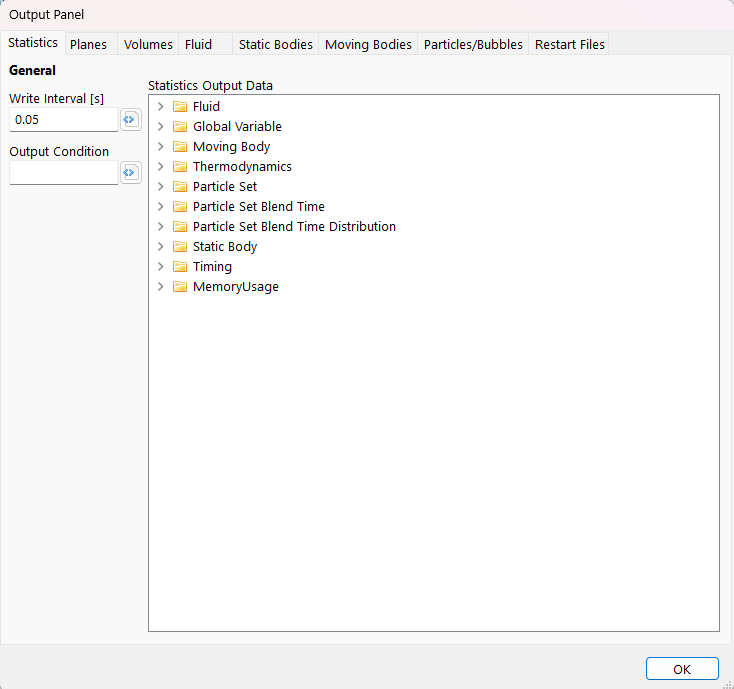
Output Panel
General
- Write Interval UDF
s | This UDF defines the interval at which spatial output data are written to the ASCII output files. This includes plane and surface outputs, as well as rendering output for particles, bodies, free-surface geometry, and spatially rendered probes. The write interval can vary with simulation time, as well as any global variables or global constants. This is a System UDF.
In the example below, the slice output interval is reduced from 0.1 s to 0.005 s between simulation times of 5 and 10 seconds. This produces a slow-motion rendering of the flow during this period relative to the standard output.
Tip
Statistics data should be written every 20–100 time steps to balance the computational overhead of file I/O with the need for sufficient temporal resolution during post-processing.
Download Sample File:
Write Interval
- Output Condition UDF
no units | This UDF defines event conditions that force an immediate statistics write. This captures output data at specific simulation events and triggers writes in addition to those scheduled by the Write Interval. This is a System UDF.
Statistics can be output ad hoc at runtime. Use this expression to set the “output” variable to true at specific times.
Download Sample File:
Output Condition
Statistics Output Data
Raw Data versus Reduced Data
Raw data are written directly from the solver without manipulation or statistical aggregation. Typical examples include the current simulation time, the position of a moving body, total particle count, inlet temperature, or other solver-state quantities. Raw outputs are single-valued data points that are either user-specified or computed directly by the solver at the time of output.
Reduced data consist of values computed from field, surface, or particle datasets using statistical reductions applied over the full dataset. Common reduction operations include sums, mean values, minima, maxima, standard deviation, coefficient of variation, and related statistical measures. These reductions collapse multi-valued field data into single-valued descriptive statistics.
In most cases, reduced quantities are computed from field data captured in the binary 3D visualization output and written as scalar values in the ASCII statistics file. Examples of reduced data include the average force on a moving body, maximum particle diameter within a particle set, system-total scalar reaction rate, or average temperature at a fluid outlet. Additional examples include the coefficient of variation of a scalar field (used to quantify mixing quality) and the average nearest-neighbor particle separation distance (used to quantify particle dispersion).
The primary advantage of reduced data is data size and usability. Full three-dimensional field data can be large and cumbersome to store, transfer, and post-process, particularly for long transient simulations or parameter sweeps. Statistical reductions condense this high-dimensional field information into compact, scalar values that are easier to archive, visualize, and analyze over time.
Note that the reduced data do not contain information that cannot, in principle, be derived from the underlying field variables. All reductions are computed directly from solver field, surface, or particle data and represent convenience summaries rather than new physical quantities. The Statistics system therefore provides a predefined set of commonly used reduction operations to simplify routine analysis tasks and reduce the need for external post-processing. Users requiring specialized or application-specific reductions may implement custom calculations using global variables, enabling tailored statistical outputs while retaining access to the full underlying field data.
Data Categories
Statistics output data consist of text-based files that record time-resolved scalar information during a simulation, including forces, torques, species concentrations, system temperatures, inlet and outlet velocities, blending metrics, and related quantities.
Statistics outputs are organized into four categories based on their association, scope, and output data structure
Component Statistics: Data associated with specific model components, with output file names linked to their dynamic names. A single ASCII .txt file is created for each component.
Histogram Statistics: Probability distribution functions (PDFs) and cumulative distribution functions (CDFs) associated with predefined histograms. Two ASCII .txt files are created for each histogram: one for the PDF and one for the CDF.
Multi-File Statistics: Outputs that generate multiple files (or directories of files) per object and/or per write time, in contrast to single-file statistics outputs that append all data to a single time-series file.
System Statistics: Data associated with system-level quantities that are not tied to any single model component. A single ASCII .txt file is created for the model.
In the sections below, each statistics output file is indexed. For each file, we document the conditions required for the file to be generated and provide links to detailed descriptions of the contained data, including the mathematical definitions of any reduced quantities.
Component Statistics
These output files are linked to specific components within the model. The output file name is the group name appended by the dynamic name of the associated component.
- Custom Variable
Custom variable records descriptive and reduced statistics associated with voxel variables over time. This file will only be printed if Voxel Variables are defined in the system.
- Global Variables
Global variables records the time-evolution of all global variables defined in the system. The column names are linked to the dynamic name of each global variable. This file is only produced when global variables are present in the model.
- Moving Body
Moving body records the time-evolution of the moving body position and velocity, as well as reduced quantities evaluated along the moving body surface. This file is only produced when a Moving Body is present in the system.
- Moving Inlet/Outlet
Moving inlet/outlet records the time-evolution of the raw data and reduced quantities evaluated over the surface of a moving inlet or outlet. This file is only produced when a Moving Inlet/Outlet is present in the system.
- Output Surface
Output surface records the time-evolution of reduced quantities evaluated over a specified output surface. This output is generated only if an Output Surface is present in the model.
- Particle Screen
Particle screen records descriptive statistics associated with the particle land points along the screen. This data is produced for Output Planes where the Particle Screen Option is enabled.
- Particles
Particles records the time-evolution of particle addition or removal rates, as well as reduced statistics associated with the particle ensemble. This file is only produced when Particles are present in the system.
- Probe
Probe records the time-evolution of the probe location and fluid properties measured at the probe location. This file is only produced when a Probe is present in the system.
- Scalar
Scalar records the time-evolution of addition or removal rates, as well as reduced statistics calculated across the scalar field. This file is only produced when a Scalar Field is present in the system.
- Static Body
Static body records the time-evolution of reduced statistics calculated along the static body surface. This file is only produced when a Static Body is present in the system.
- Static Inlet/Outlet
Static inlet/outlet records the time-evolution of the raw data and reduced quantities evaluated over the surface of a static inlet or outlet. This file is only produced when a Static Inlet/Outlet is present in the system.
- Thermal Field
Thermal Field records the time-evolution of heat transfer rates and mean fluid temperature. This includes global interface, surface, and dissipation heating contributions. This file is only produced when a Thermal Field is present in the system.
Histogram Statistics
- Histogram
Histogram records the time-evolution of the probability density function of the observed variable, per the user-defined bin width and extents. This file will only be printed if one or more histograms are defined in the system.
- Histogram Cumulative
Histogram cumulative records the time-evolution of the cumulative probability density function of the observed variable, per the user-defined bin width and extents. This file will only be printed if one or more histograms are defined in the system.
Multi-File Statistics
- Nearest Neighbor Distance
Nearest Neighbor Distance records the nearest neighbor separation distance between particles and the corresponding nearest neighbor distribution function. This file is only produced when particle sets are present in the model and the corresponding Compute Nearest Neighbor Distribution selection is active.
- Control Volume
Control volume records descriptive statistics associated with both the fluid and any particle sets contained within the control volume. It also reports fluid fluxes across the control volume surfaces. A directory is produced for each control volume. The name of this directory is linked to the dynamic name of the control volume. Within each control volume directory, individual statistics files exit for fluid and particle data. These directories and files will only be printed if Control Volumes are defined in the system.
- Output Line
Output line records the time-evolution of fluid properties measured along an output line. This file is only produced when an Output Line is present in the system.
System Statistics
These output files contain system-level data that are not linked to any specific components within the model.
- Domain
Domain records the time-evolution of the position, velocity, and acceleration associated with these system-level dynamics. This file is only produced when external dynamics are applied to the lattice domain.
- Fluid
Fluid records a set of descriptive statistics associated with the fluid and how these statistics evolve over time. This file is produced when the fluid configuration is set to either single phase, free surface, or immiscible two-fluid.
- Immiscible Thermal Transfer
Immiscible Thermal Transfer records the heat flux between Fluid 1 and Fluid 2. It is produced when the fluid configuration is set to immiscible two fluid and interfacial heat transfer is enabled.
- Interface
Interface records a set of descriptive statistics associated with the interface and how these statistics evolve over time. It is produced when the fluid configuration is set to either free surface or immiscible two fluid.
- Memory Usage
Memory usage records a component-level breakdown of the simulation memory requirements and how these requirements vary over time.
- Particle Exits
Particle exits records the descripting statistics of individual particles existing in the system. This file is only produced if the Exit Statistics are selected on the Particles/Bubbles Output Panel.
- Thermodynamics
Thermodynamics records a set of descriptive statistics associated with energy input to the fluid, as well as overall energy storage and dissipation. This file is produced when the fluid configuration is set to either single phase, free surface, or immiscible two-fluid.
- Timing
Timing records a component-level breakdown of the simulation runtime speed and how this speed varies over time.